Travel Blog
The latest news and notes from the Travel team
Show off your hotel with new photo tools in Google My Business
Tuesday, February 24, 2015
Last June we
introduced
you to
Google My Business
— giving you an easy way to improve your hotel's presence on Google and connect with customers, whether they're looking for you on Google Search, Maps or Google+.
Starting today, you can tell us which image you’d like to appear when customers search for your hotel on Google. You can even add photos specifically for food and drink, rooms and common areas. It's easy! Just log in to Google My Business on the web or in the
Android
or
iOS
apps, and visit the Photos section.
If you haven't already done so, visit
google.com/mybusiness
to verify your hotel and get started. For more information, you can read the
full blog post
on the Google and Your Business blog.
Posted by Ashwath Rajan, Product Manager, Travel
Google Flight Search lands in Switzerland to help you find the best destinations and deals
Monday, February 02, 2015
Whether you’re traveling from Geneva to Barcelona, Zurich to Sydney, or you’re not sure where to go,
Flight Search
can offer inspiration and help you find the best flights available. Starting today, you can use Google to quickly and easily compare and book flights — from your mobile device, desktop or tablet. Try searching for [
flüge von zürich nach barcelona
] on
google.ch
, ask Google to show you flights from Geneva to Tenerife, or go directly to
www.google.ch/flights
.
More information and flexible features to help you find the best deals
If you haven’t decided where to travel next, expand the map in Flight Search to scan the entire world and see live prices for all the different cities you can fly. It’s a great way to
explore the world around you
and find somewhere new to travel.
You can easily find the least expensive time to travel if your dates are flexible; just use the
calendar
or the lowest fares graph below that shows you when it’s cheapest to fly.
Scan the
similar flights timeline
to compare available flights — grouped together by airline, price and number of stops. You can also quickly determine which flights are the best tradeoff between price and convenience by looking at those labeled
Best flights
.
Google can also monitor flight prices for you, to make sure you don’t miss a good deal. Check out your list of saved flights within Flight Search to see if the prices are trending up or down, how often they change and by how much. You can also let the Google app on your
Android
or
iOS
keep tabs for you. When the price drops for itineraries you’ve previously searched for on Google, you’ll see a Now card that
notifies you of the airfare change
.
Want help keeping track of travel itinerary details for upcoming or past trips? Try searching for [
My trips
] within Google to see a summary of your flight, hotel, car and restaurant reservations — in one convenient place.
Flight Search
gives you more information faster, so you can make informed decisions about the best flights for you. Give it a try and let Google help you with all your 2015 travel plans.
Posted by Marek Turski, Tech Lead Manager, Travel
Google makes it easier to shop for flights to popular destinations
Wednesday, September 24, 2014
If you often fly on popular air routes -- like Los Angeles to San Francisco -- you’ve probably faced the challenge of sifting through long lists of nonstop flights, all with similar prices. In fact, routes like these have over 50 nonstop flights every day. While having all the information in one place is convenient, the choices can be overwhelming -- especially on a mobile device.
Now
Flight Search
offers a new way to shop for flights on popular routes that makes it much easier to scan available flights and quickly determine which is best for you. Instead of displaying every flight individually, Flight Search groups together similar flights, then displays those departure times on a one-day timeline. Flights are grouped by airline, price and number of stops -- and
Best flights
highlight those options that are the best tradeoff between price and convenience.
Best flights with new similar flights timeline.
Expanded list of similar flights.
To use the timeline, tap on a circle to select a single flight. Alternatively, tap anywhere else in the similar flights box to expand the full list of individual flights. You can then select a specific flight, or tap on the similar flights box again to collapse the list.
We think this unique display will make it easier and faster to find the best flight possible, whether you’re shopping on a mobile device or desktop. Timelines only appear on busy air routes with many similar flights. Give it a try on your next business trip or vacation on one of these busier routes.
Posted by Peter Balsiger, Software Engineer, Travel
Let Google Now help you with your end of summer travel plans
Tuesday, August 19, 2014
As you’re planning that end of summer vacation, let
Google Now
ease your travels and help you spend less time digging for information – so you can have more time to enjoy your trip.
Before you even leave your house, Google Now can tell you what the weather will be like at your destination – so you can pack any last minute items – and how much traffic to expect before you head to the airport. You can also check the status of your flight to make sure it’s on-time.
And starting now, on your Android device, you’ll get help if your flight is delayed or cancelled. With one tap on the “Find alternate flights” link, you’ll quickly see a list of available options and have the necessary information to get your flight rebooked.
At the airport, boarding passes for some airlines will be automatically displayed to help you breeze through to the gate. And once you arrive at your destination, you’ll get reservation details and directions to the car rental center as well as your hotel (if you’ve received a confirmation in your Gmail).
If you haven’t planned out every detail of your stay beforehand, no worries! You’ll see suggestions to explore nearby attractions, events and photo spots — as well as get reminders with local restaurant reservations and directions. And, if you’ve got tickets to a show or a concert in your Gmail, Google Now will have it ready when you arrive at the venue.
These goodies and
more
are waiting for you in the latest version of the Google Search app on
Google Play
. If you use an iPhone or iPad, you can also download the latest version of the Google Search app from the
App Store
. Enjoy your trip!
Posted by Fred Brewin, Product Manager, Google Now
Hoteliers can improve their online presence with Google My Business
Wednesday, June 11, 2014
(Cross-posted on the
Google and Your Business Blog
)
Today we are announcing
Google My Business
, a single place for hoteliers and other local businesses to quickly and easily update their business information and add beautiful photos that are displayed to their customers -- whether they’re looking for you on Google Search, Maps, Google+ or
Google Hotel Finder
.
To see how easy it is to improve your hotel’s presence on Google and connect with customers, read the
full blog post
on the Google and Your Business blog or visi
t
google.com/mybusiness
to verify your hotel and get started.
Posted by Tom Mulders, Sr. Program Manager, Travel
Feeling Lucky? Explore flights in fun, new ways with Google
Tuesday, June 10, 2014
Just over a year ago, we launched an experimental feature called explore flights to give you a unique, price-focused way of exploring different destinations within a region. It's still available, but over the next few days we’ll be rolling out some of the most popular functionality right into
Flight Search
-- plus a few other surprises.
So, whether you know where you want to go or want to throw caution to the wind and visit some place completely new, we've got some fun, new ways to help you explore the world around you! See it in action.
If you’re looking for some inspiration, you can click on the map to enter a full-screen exploring experience. You can pan the entire world and see all of the different cities you can fly to, see photos of the top attractions for each city and see how the price changes based on holidays, day of the week or time of year.
If you’re feeling really adventurous, try the “I’m Feeling Lucky” feature. It’s kind of like a travel slot machine. Simply select the “I’m Feeling Lucky” button from within the expanded map and we’ll give you ideas of where to go. You can add price or time limits and press the button as many times as you want -- we’ll keep suggesting destinations you might like.
Additionally, whenever you type a region (e.g. “South America”) as your destination in Flight Search you’ll see cards for the most popular destinations within that region, and destinations personalized for you based on your past searches. We’ll also provide a map so you can see where these places are located -- as well as the lowest fare and duration to fly to each place.
As you start to plan your next vacation, try
google.com/flights
for yourself. We hope it makes your destination selection process more fun and informative.
Posted by Gus Prevas, Software Engineer, Travel Team
Google+ Stories and Movies: memories made easier
Tuesday, May 20, 2014
(Cross-posted on the
Google Official Blog
)
A suitcase full of dirty clothes. A sad-looking house plant. And 437 photos and videos on your phone, tablet and camera. This is the typically messy scene after a vacation. And although we can’t do your laundry (thanks but no thanks), or run your errands (well, maybe
a few
), we’d still like to help. Enter Google+ Stories, which can automatically weave your photos, videos and the places you visited into a beautiful travelogue.
No more sifting through photos for your best shots, racking your brain for the sights you saw, or letting your videos collect virtual dust. We’ll just gift you a story after you get home. This way you can relive your favorite moments, share them with others, and remember why you traveled in the first place.
Stories will be available this week on Android and the web, with iOS coming soon. In the meantime you can browse my story below (click to start), or explore a few others by paraglider
Tom de Dorlodot
, and DJ
Steve Aoki
.
When it’s less about travel, and more about today's events (like a birthday party, or baby’s first steps),
Google+ Movies
can produce a highlight reel of your photos and videos automatically—including effects, transitions and a soundtrack. Today we’re bringing Movies to Android, iOS and the web, so lots more people will receive these video vignettes.
A movie of my daughter’s first bike ride, created automatically by Google+
To get started with Stories and Movies, simply
back up
your photos and videos to Google+. And that’s it.
Auto Awesome
will get to work in the background, and you’ll get notified when a story or movie is ready.
In fact: if your photo library is already online, you may already have stories waiting for you. So look for the new app in
Google Play
, view the full list of improvements
on Google+
, and enjoy your walks down memory lane.
Posted by
+Anil Sabharwal
, Director of Product Management
Calendar shopping for flights just got easier
Thursday, February 06, 2014
Let’s say you want to go skiing in Vail, Colorado this winter, but you’re flexible on when you leave and how long you stay. Try our improved
Flight Search
calendar from any of your devices to help you quickly figure out the best deal. As soon as you start entering your dates, a new, expanded calendar pops up with the lowest fare highlighted for each day. Select your outbound date and prices update instantly for return dates. You can change stops, length of stay, preferred airline or more -- and prices update instantly, without having to do any extra searches!
To see how prices may fluctuate based on the season, holidays or other events, use the lowest fares graph under the calendar. It lets you scroll through future months to quickly and easily compare airfares across dates. Now you can see low-fare flight options, even if your travel dates are far in the future.
For your Vail trip, as you enter your origin and destination cities, a calendar pops up with lowest fares for each day. If you quickly scan the lowest fares graph below, you’ll see that March is the least expensive time to travel. Select your outbound and return dates. Try restricting the results to non-stop flights and compare the price difference for a 3, 4 or 5 day trip. Now you can make your final selections and book your flight, feeling confident you’ve found the best option for your trip.
We hope the changes we’ve made will help you save time and money! If you haven’t already done so,
try
our enhanced calendar shopping and lowest fares graph when planning your next trip.
Posted by Rani Manoharan, UI designer, travel
Take off for the holidays with Google Street View
Wednesday, December 04, 2013
(Cross-posted on the
Google Maps blog
)
Whether it’s touring the canals of
Venice
, swimming with the seals in the
Galapagos
or climbing the
Burj Khalifa
in Dubai, Street View has taken you to some of the most beautiful and exciting places around the world. Now, in addition to scoping out your destination, Street View can help you cut down the stress of traveling by giving you a preview of your journey, too. Our first efforts to map global transit locations include 16 international airports, over 50 train and subway stations, and even a cable car station in Hong Kong.
Here’s an
interactive map
so you can see the new Street View transit locations worldwide.
Now you can visit the check-in counter of your airline in Madrid, map out the way from baggage claim to the bus at Tokyo International Airport and check out where to pick up your rental car at Eindhoven Airport; you can even scope out your seat on an Emirates flight from Dubai! Or, if you’re planning to take the train, navigate through Waterloo station so you can be one step ahead, whether you’re with a group of friends, family or a baby stroller.
Check in at Madrid Barajas, ES
Arrivals, Tokyo International Airport, JP
Eindhoven Airport, NL
Emirates A380 at Dubai Airport
Waterloo Station, London, UK
Don’t let travel logistics get you down this holiday season. With Street View, you can see how to get where you’re going faster and easier. Enjoy and safe travels!
Posted by Ulf Spitzer, Google Street View Program Manager
Dreaming where to go with your AAdvantage miles?
Thursday, March 21, 2013
Want to go on that dream vacation with your American Airlines’ AAdvantage miles but not sure where you can fly? Redeeming miles for flights just got easier now that American has launched the new
Award Map
, powered by our
QPX™ Reward Shopping
feature.
This new tool helps users quickly and easily search for and book award travel using their AAdvantage miles. Users simply search with criteria, such as destination category by region or interest, and the miles they wish to use, in addition to regular search parameters like their departure airport, dates of travel and cabin preferences. Behind the scenes the QPX Reward Shopping engine quickly computes a huge number of possibilities to present the user with all available award flight options within their desired mileage amount. Available destinations are then displayed on American’s intuitive Award Map, making it easy for travelers to evaluate all their options and book using their AAdvantage miles.
“We’ve had a long standing relationship with American Airlines, helping them innovate with pricing and shopping since 2004,” said Gianni Marostica, Commercial Director for Travel at Google. “We were thrilled to help them take this latest innovation from idea to implementation in a few short months. Congratulations to the team at American Airlines on this exciting and successful launch.”
Posted by Nate Nottke, Senior Technical Account Manager
Bon Voyage, Buon Viaggio, Buen Viaje, Bon Viatge, Boa Viaxe!
Monday, March 18, 2013
If you live in the UK, France, Italy, Spain or the Netherlands -- and are thinking of hiking the Swiss Alps, visiting the Greek Isles, taking a bite out of the Big Apple in NYC or simply planning a business trip --
Flight Search
is now available to make planning your trip easier.
Starting today, you can use Flight Search to quickly find, compare and book flights originating from each of these countries to any airport in the world. You'll also be able to search for flights from airports in these countries and see prices in your local currency. Additionally, you can conduct searches in 8 languages: English, French, Italian, Spanish, Basque, Catalan, Galician and Dutch -- and see prices in your local currency.
Smarter travel planning
Let’s say you’ve decided the Greek Isles are your vacation destination of choice, but you’re not sure which airport offers the most affordable fares. By typing ‘Greece’ as your destination, you’ll be able to quickly compare the cost of the different options, viewing live prices on the map.
Likewise, if you’re looking to take the family to New York City but are unsure of the best time to go, you can click on our ‘Lowest fares’ icon to see which dates will get you the lowest fare.
We choose the best flights based on cost and total travel time, while covering a variety of departure times and airlines. But, you can always view longer or more expensive flights by selecting, 'Show all'. Flight Search makes it easy for you to:
Find flights quickly
. As you make changes to dates, destinations and filters, results will load fast in a format that’s easy to scan.
Discover places to go on a map
. Explore possible destinations and view live ticket prices by surfing the map. You can filter by price, airline or flight duration.
Figure out the best time to travel
. Quickly see which travel dates are least expensive by dragging the date selector forward or backward, or click the "Lowest fares" icon to compare lots of dates at once.
See a simple list of the most relevant flights
. Use our easy-to-scan list or compare options and find the flight that's most convenient, least expensive, wi-fi enabled or simply the one that best meets your needs.
Sometimes we are not able to show results for every single airline and we will make that clear. We are working to expand our relationship with other airlines, and bring Flight Search to more countries and in more languages.
To access Flight Search in your local country or language, type:
google.co.uk/flights/
google.fr/flights/
google.it/flights/
google.es/flights/
google.nl/flights/
We’ve worked to provide you with fast results as you browse a simple list of the most relevant flights, figure out when to travel, and get ideas about where to go and book your trip online. We hope you’ll enjoy planning your next trip with
Flight Search
! Bon Voyage!
Posted by Noam Ben Haim, Senior Product Manager, Travel
Explore neighborhoods and easily find hotels with new Google Hotel Finder features
Tuesday, February 05, 2013
When visiting a city for the first time, you may want to stay close to the sites you want to see -- or, you may wish to stay in an area of town that you find intriguing. We've made it easier for you to do both, via a new Google Hotel Finder feature that makes it easy to explore neighborhoods in some of the most popular destinations.
Just go to
www.google.com/hotels
and choose the city you’re planning to visit. After you pick your travel dates, you’ll see a small panel on the top left corner of the results map. You can hover over that panel to see descriptions of different neighborhoods within the city you’ll be visiting. When you’ve done your reading and chosen the neighborhood that best suits your travel needs, you can select that neighborhood to narrow the list of available hotels.
In addition to making it easier to choose the location of your hotel, we’ve also simplified the process for filtering hotel results. To take advantage of this improved experience, simply type your preferences in the search box along with the location (e.g. “3 star hotel in London under $200 with wifi”). The correct filters will be automatically set.
Finally, you will now be able to find your favorite hotel chains with greater ease via a new filter that restricts results by hotel brand.
We look forward to helping you find the best hotel for your next trip.
Posted by: Maciek Nowakowski, Product Manager, Travel
Now you can use Flight Search to plan a trip for the whole family
Thursday, January 31, 2013
Since launching
Flight Search
, we’ve heard from many travelers eager to use Flight Search to plan trips for their entire family. Starting today, we’re adding support for multiple passengers, as well as children and infants.
It’s easy. Select the number and type of passengers you want to bring along. Your price will be updated, instantly. Then click on the “Book” button to conveniently complete your booking with our partners.
Our goal is to make planning and booking travel as fast and enjoyable as possible -- whether you’re traveling alone, with a friend or with your entire family. Try
Flight Search
today to see how fast and easy it is.
Posted by Bob Lewis, Software Engineer
Flight Search lets you search for regions, not just airports
Monday, January 28, 2013
Let’s say you want to take your family to Hawaii for spring break, but you’re not sure which of the islands sounds most appealing. There is now a way to quickly and easily search for a broader set of destination information. In this case, instead of checking prices to Kailua-Kona or Kahului, you could type ‘Hawaii’ into
Flight Search
. Live prices would then appear on the map, so you can quickly compare the cost of the different options.
Whether you’re planning a trip on your desktop, tablet or phone, you can use
Flight Search
to search for countries, states, islands and even continents from any U.S. or Canadian origin.
Try searches like ‘Australia’, ‘Europe’ or ‘Florida’, and don’t forget to send us a postcard!
Posted by Peter Balsiger, Software Engineer
A better, faster travel planning experience: 2012 updates
Wednesday, December 19, 2012
(Cross-posted on the
Google Inside Search blog
)
Google aims to help people turn their intents into actions, lightning fast. For travelers, this means we’re helping to take the complexity out of planning a trip by making it fast and easy for users to find the information they need to plan their next journey. Whether you’re looking for information about flights, hotels, activities or destinations, we have tools to help you -- and they are easily accessible for people on the go. Some of our favorite new functionality is outlined below.
More information, better presentation
This year, we’ve made some changes to the user interface of Flight Search, and added features that offer more information about amenities and fees; we did this to help users feel well-informed, and to help them quickly choose the best itinerary.
For instance, you can now quickly compare multiple destinations and multiple days simultaneously, using live prices, with our recently introduced experimental feature called Flight Explorer. Try it at
www.google.com/flights/explorer
.
Flight Explorer experiment search results page
You can also use a number of new features to tailor your flight shopping:
More easily calculate the total cost of your trip by taking a look at the baggage fees displayed next to each flight option
Choose a flight offering in-air connectivity by viewing a new indicator noting flights that offer Wi-Fi
Consider a little more luxury in the sky by comparing the cost of flying business or first class instead of coach
Easily plan complex itineraries -- such as those including multiple stops, or trips that involve a flight into one city and a return trip from another -- without confusion, using our new, user-friendly interface
Multi-city trip, Wi-Fi availability indicator, upgrade cost and checked baggage fees
Going global
In March, we made it possible for users to find flights to more than 500 destinations outside the US. Soon after, we enabled this capability for
any
international destination airport, for flights originating from the US or Canada. Globetrotters can try these features at
www.google.com/flights
, or just type your departure city and destination in the search box.
Results for international destination flight
And late this year, we rolled out localized versions of Hotel Finder in France, Italy, Germany, Spain, Switzerland, Austria, Portugal, UK and Ireland. Now, people in those areas can search for and view hotel options in their own language and currency.
Helping people make informed hotel choices
In 2012, we made it even easier to find and book the right hotel for you using Hotel Finder. We also added more content including Zagat reviews and amenities. Hotel Finder now shows the price and availability for a choice of room types.
Pricing information, reviews, hotel details on Hotel Finder
Varying room types on Hotel Finder
You can try these features, and others, at
www.google.com/hotels
.
Empowering road warriors, delivering better destination data
In September, we made it easier for you to find the information needed to plan a trip, whether you’re searching via desktop,
smartphone
or
tablet
.
Soon after, updates to
Google Now
offered a number of ways for you to stay informed while on the go:
Automatic flight status notifications
Updates on weather at your destination
Showcase of events happening nearby
Website suggestions to help you explore as you research things to do
Electronic boarding pass cards for ease of travel
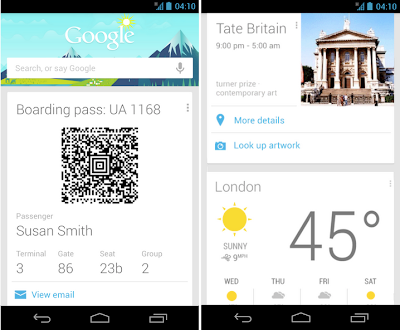
Google now travel cards
Finally, you can easily tap into the collective intelligence of the web to uncover a list of information relevant to your destination, using the Knowledge Graph carousel -- and hopefully, find inspiration.
Knowledge Graph carousel list of activities in Rome
Stay tuned for more. We think you’ll love what we have coming your way in 2013.
Posted by Jeremy Wertheimer, Vice President, Travel
New Google Now: the perfect travel companion for the holidays
Thursday, December 06, 2012
(Cross-posted on the
Android Official blog
)
Now Dasher! Now Dancer! Now, Prancer and Vixen! On, Comet! On, Cupid! On, Donner and Blitzen! For Santa’s holiday travel this season,
Google Now
is just the prescription.
As you head off this holiday season, the latest update to Google Now makes it even more useful for traveling. Before you even leave your house, Google Now will tell you what the weather will be like at your destination (just in time to make sure you remember to pack those mittens). At the airport, your boarding pass is automatically pulled up, helping you breeze through to the gate (launching shortly for United Airlines, with more to come). And once you've arrived at your destination, Google Now can help you uncover some great activities, by showing you events happening around you, suggesting websites for you to explore as you research things to do, or allowing you to learn more about specific pieces while you’re at a museum (using Google Goggles).
All of this builds on top of some of the other cards designed for travel, like the currency conversion, translation, and flight status cards -- hopefully taking a little bit of the stress out of holiday travel so you can focus on family and fun.
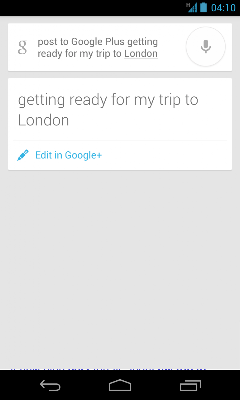
We're also making Voice Search even more powerful: you can find out the name of the song that’s playing (“What’s this song?”), quickly find product info (“Scan this barcode”) and post updates to Google+ simply by using just your voice.
These goodies are waiting for you in the updated
Google Search
app, available on
Google Play
for devices running Android 4.1, Jelly Bean, or higher.
Posted by Baris Gultekin, Product Management Director
Travelers can now access Flight Search from their tablets
Friday, September 28, 2012
(Cross-posted on the
Google Inside Search blog
)
More and more travelers are using tablets to search for and book travel. In fact,
46% of all US tablet owners
who search for travel, actually purchase via their tablet. We also know that people use their tablets differently than they use their desktop. That’s why we’ve optimized our
Flight Search
experience for those who prefer to search with a tablet, such as a Nexus 7 or an iPad.
Starting today, travelers can search for and book flights on any tablet device by going to
http://www.google.com/flights/
. With the touch of your finger, you can easily explore places to visit on the map and see prices updated in real-time for each destination.
If you’re flexible with your dates you can also use our lowest fares tool and scroll across days, weeks and months to find the cheapest dates to take your trip. Your results will be updated super-fast, even when you switch dates or destinations.
We hope this makes planning your next trip easier and more enjoyable -- whether you’re using your desktop, laptop,
mobile device
or tablet. We look forward to your continued feedback on
Flight Search
.
Posted by Rani Manoharan, User Interface Designer, Travel
OnTheFly™ 1.2 for Android just made it easier to plan your trip
Friday, September 30, 2011
We just released the latest version of our airfare shopping mobile app for Android. One of the new features in OnTheFly™ 1.2 is the flexible date search that allows you to browse 35 days of potential departure dates on a calendar combined with an interactive price graph.
You can also save and access search history now, including particular itineraries of interest. We’ll even check price changes for those itineraries so you can know the best time to plan that dream trip.
Designed to demonstrate the comprehensive search abilities offered with our QPX™ airfare shopping engine, OnTheFly makes it fast and fun for you to compare options across airlines, dates, and alternate cities/airports.
If you haven’t already tried OnTheFly, you can download it for free from the
Android Market
or
App Store
. OnTheFly for use with BlackBerry (OS 4.6+) can be accessed at
http://bbmatrix.itasoftware.com
.
We’re excited about the response to OnTheFly so far, both from our first time and loyal users! Keep sending us your
feedback and suggestions
.
Posted by Stefan Frank, Product Manager
Labels
Case studies
Corporate news
Customers
Google Flights
Google Flights price tracking
Google hotel search
Google Travel Blog
Guest post
Hotel Deals
hotel search on google
Hotels
Industry news
Mobile
New features
product announcements
Products
Smart Filters
Travel
User tips
Videos
Archive
2016
Jul
Mar
Feb
2015
Nov
Oct
Sep
Feb
2014
Dec
Nov
Oct
Sep
Aug
Jul
Jun
May
Apr
Mar
Feb
Jan
2013
Dec
Nov
Jul
May
Mar
Feb
Jan
2012
Dec
Oct
Sep
Aug
Jul
Jun
May
Apr
Mar
Feb
Jan
2011
Dec
Nov
Oct
Sep
Feed
Follow @googletravel
Give us feedback in our
Product Forums
.