Travel Blog
The latest news and notes from the Travel team
Let Google help you plan a delicious, multi-city meal this Thanksgiving
Tuesday, November 25, 2014
Break out the stretchy pants: Thanksgiving is right around the corner. Before settling in for a day of family, football and food coma, many weary travelers earn their eats through another time-tested holiday tradition: travel. This year, plan a different kind of holiday — one where you can enjoy your meal on the fly (literally). Check out our jet-setting, turkey-day-travel-itinerary that takes you across 4 historic American cities named after your favorite Thanksgiving eats, like Cranberry Country, WI and Pie Town, NM. Planning your adventure is easy with Google travel tools that can help you quickly find the best flights, hotels and things to do.
You can use the itinerary we’ve saved as your recipe for adventure or go to
www.google.com/flights
to quickly and easily plan your own multi-city meal — selecting the destinations and portions that appeal to you.
Take our suggestion and start your edible itinerary with the star of the show: the turkey. Fly into AMA (Amarillo, TX) and drive to the small town of
Turkey, TX
. With a population of less than 1,000 and an annual festival honoring native son and Western Swing musician Bob Wills, it’ll be a leisurely visit. Swing by the dry goods shop on Main Street, or check out the Bob Wills Museum, with twice-weekly live music shows.
Once you’ve had your fill of Turkey, TX, hop a flight to JAX (Jacksonville, FL) and make the quick 50-minute drive to Spuds, FL to indulge in everyone’s favorite starchy side dish. Primarily a farming community, the main crop in Spuds is — you guessed it — potatoes. Only 20 minutes away is St. Augustine, the oldest European settlement in the country. You can enjoy a variety of historically themed activities to indulge your turkey day traditionalist, including the
Colonial Quarter
and the
Florida Agricultural Museum
.
Up next? A visit to Cranberry Country by way of MKE (Milwaukee, WI). Take a relaxing drive on the scenic
Cranberry Highway
with nearly 50 miles of cranberry bogs, some that have been functioning farms since the 1870s. You can also take a 2-hour drive to Chicago where there are plenty of Thanksgiving-themed events to keep you entertained. Bundle up on Thursday morning to watch the
81st Annual McDonald’s Thanksgiving Parade
, featuring floats, local celebrities and marching bands.
When the tryptophan finally kicks in, ask Google to show you “
Hotels in Chicago
” and you’ll see several options available. Select your preferred hotel and quickly book with one of our travel partners. Hit the town early the next morning for a day of Black Friday deals along the famed
Magnificent Mile
, where for over 50 years, the trees along Michigan Avenue have been draped with thousands of twinkling holiday lights.
There’s no better way to end your meal than in aptly-named
Pie Town, NM
. After landing in ABQ (Albuquerque, NM), settle in for a 2.5-hour drive to the tiny community made famous for its proximity to the Continental Divide and its pie. Try Pie-o-Neer Pies, a
Travel + Leisure featured restaurant
. It’s known for chocolate pies, butterscotch pies and New Mexico Apple pie made with green chiles and pine nuts. Sure, it’s a bit of a departure from tradition, but after this whirlwind Thanksgiving food tour, a spicy slice sounds just right.
Hungry yet? Why don’t you invite a friend to join you on this tasty, turkey-day trip. Select “Share this itinerary” and your friend will receive an email summary like the one below. When they select the blue button reading, “View on Google”, they’ll be directed to
Flight Search
where they can see the full itinerary and quickly complete their booking so they can join you on this multi-city, meal march.
Whether you decide to follow our recipe or plan your own Thanksgiving adventure, we hope you’ll see how fast and easy it is to use Google to find the best flights, hotels and things to do on your next trip.
Posted by Cheryl Eisele, Product Marketing Manager, Travel
Let Google help you visit the world’s most haunted places… if you dare
Wednesday, October 29, 2014
Halloween is coming up -- and that means it’s time to get your spook on. Dress up in costumes, tour haunted attractions or visit a real-life haunted house. With a few simple voice prompts and taps, Google can help you plan a trip to some of the spookiest places around.
You might consider visiting the
Beechworth Lunatic Asylum
-- a 19th century, abandoned asylum in Australia rumored to have nearly 9,000 souls haunting its halls. Or travel to Ireland, in pursuit of Halloween’s Celtic roots. You could visit the
Ross Castle
-- believed to be one of the most haunted castles in Ireland.
If you’re really daring, you can stay the night in the 1851
Marshall House
in Savannah, GA -- where water faucets turn on and off, doorknobs wobble, unseen children are often heard playing in the halls, and staff and guests routinely see men wearing Civil War uniforms.
It’s easy to visit these haunts no matter where you live. Just ask Google to show you flights or begin your search on
google.com/flights
. You can quickly compare the cost to different destinations, find tips to save money and choose the “best flights” -- based on price and convenience. Live in NYC? A weekend trip to Savannah might be in your future.
With a few taps, you can select your outbound and return flights, and complete your booking on our partner’s website.
When you’re ready, ask Google to show you the “closest hotels to the Marshall House” and you’ll see a list of nearby hotels, including -- of course -- The Marshall House. You can view photos of the hotel, peruse user reviews and digitally explore the surrounding area with Street View. If you’re dying to stay here, simply tap one of the booking links to complete your reservation.
Now that you’ve seen how frighteningly fast and easy it is, let Google help you plan your next trip.
Posted by Cheryl Eisele, Product Marketing Manager, Travel
Google makes it easier to shop for flights to popular destinations
Wednesday, September 24, 2014
If you often fly on popular air routes -- like Los Angeles to San Francisco -- you’ve probably faced the challenge of sifting through long lists of nonstop flights, all with similar prices. In fact, routes like these have over 50 nonstop flights every day. While having all the information in one place is convenient, the choices can be overwhelming -- especially on a mobile device.
Now
Flight Search
offers a new way to shop for flights on popular routes that makes it much easier to scan available flights and quickly determine which is best for you. Instead of displaying every flight individually, Flight Search groups together similar flights, then displays those departure times on a one-day timeline. Flights are grouped by airline, price and number of stops -- and
Best flights
highlight those options that are the best tradeoff between price and convenience.
Best flights with new similar flights timeline.
Expanded list of similar flights.
To use the timeline, tap on a circle to select a single flight. Alternatively, tap anywhere else in the similar flights box to expand the full list of individual flights. You can then select a specific flight, or tap on the similar flights box again to collapse the list.
We think this unique display will make it easier and faster to find the best flight possible, whether you’re shopping on a mobile device or desktop. Timelines only appear on busy air routes with many similar flights. Give it a try on your next business trip or vacation on one of these busier routes.
Posted by Peter Balsiger, Software Engineer, Travel
Let Google Now help you with your end of summer travel plans
Tuesday, August 19, 2014
As you’re planning that end of summer vacation, let
Google Now
ease your travels and help you spend less time digging for information – so you can have more time to enjoy your trip.
Before you even leave your house, Google Now can tell you what the weather will be like at your destination – so you can pack any last minute items – and how much traffic to expect before you head to the airport. You can also check the status of your flight to make sure it’s on-time.
And starting now, on your Android device, you’ll get help if your flight is delayed or cancelled. With one tap on the “Find alternate flights” link, you’ll quickly see a list of available options and have the necessary information to get your flight rebooked.
At the airport, boarding passes for some airlines will be automatically displayed to help you breeze through to the gate. And once you arrive at your destination, you’ll get reservation details and directions to the car rental center as well as your hotel (if you’ve received a confirmation in your Gmail).
If you haven’t planned out every detail of your stay beforehand, no worries! You’ll see suggestions to explore nearby attractions, events and photo spots — as well as get reminders with local restaurant reservations and directions. And, if you’ve got tickets to a show or a concert in your Gmail, Google Now will have it ready when you arrive at the venue.
These goodies and
more
are waiting for you in the latest version of the Google Search app on
Google Play
. If you use an iPhone or iPad, you can also download the latest version of the Google Search app from the
App Store
. Enjoy your trip!
Posted by Fred Brewin, Product Manager, Google Now
Easily plan trips from Denmark, Norway and Sweden now using Flight Search
Monday, July 21, 2014
Starting today, travelers living in Denmark, Norway or Sweden can use Flight Search to quickly find, compare and book flights originating from each of these countries by accessing
www.google.dk/flights/
,
www.google.no/flights/
and
www.google.se/flights/
, or by searching for flights directly within Google. Additionally, you can search in your local language and see prices in your local currency from your mobile device, tablet or desktop.
Let’s say you live in Norway and you want to plan a summer getaway. If you access Flight Search, you’ll immediately see the price, duration and type of flight for several popular destinations you might like to visit -- based on your preferences and previous searches. If you set your dates and tap to expand the map, you’ll see live prices for destinations around the world. A trip to Kristiansand sounds nice.
Once you tap on Kristiansand, you’ll automatically be presented with a list of ‘Best flights’ (flights that represent the best tradeoff of convenience and price) and a tip for how you can save a bit. In this case, you can save NOK928 just by leaving one day later. For nearly a thousand Krones it might be worth it!
When you’re ready, you can select the tip, choose your outbound and return flight, and reserve your flights by tapping the red book button.
As you start to plan your next trip from Norway, Sweden or Denmark, try
www.google.no/flights/
,
www.google.se/flights/
or
www.google.dk/flights/
for yourself.
As a reminder, anyone can use
www.google.com/flights
to plan trips worldwide. We hope Flight Search makes it fast and easy to explore where you want to go and figure out the best time to travel!
Posted by Stefan Trienen, Partner Development Manager, Travel
Ok Google. Find me a hotel...
Friday, May 09, 2014
It’s
U.S. National Travel & Tourism week
-- whether you’re traveling for business or pleasure, you can plan it all from your mobile phone.
Let’s say you’re on a business trip in Miami and you decide to stay through the weekend to head down to Key West. You can say “Ok Google, show me tourist attractions in Key West”. Quickly you see there are a ton of fun things to do near Key West: you can visit the Butterfly and Nature Conservatory, take a tour of Ernest Hemingway’s house and relax with a Margarita on the sunny beaches!
Now you need to find a hotel. Just ask your phone again, “Ok Google, show me hotels with a view in Key West.” You’ll find several nice options and you can tap on one to see more details about the hotel, including photos and reviews. You can easily scroll through the photos to get a better feel for what the hotels look like.
You can also tap on “See inside” to take a 360° tour of the hotel and property with
Google Maps Business View
. Just a few taps later and you’re booked at the Southernmost on the Beach Hotel.
You can also check business hours for the attractions you want to visit, get directions from your hotel (whether you’re walking or driving) and figure out which restaurants to hit up while you’re there -- even filtered by type of cuisine. Ask your phone “Ok Google, show me seafood restaurants in Key West.” If you further filter by ratings, you’ll see our hotel has a highly rated, surfside dining spot. You can also use the “See inside” 360° tour to see the awesome view from the cafe.
We hope our tips for using your phone to figure out where to go, what to do and where to stay will help you plan an amazing vacation. Try saying ‘Ok Google…” and start planning your next trip today.
Posted by Lin Classon, Product Marketing Manager, Travel
MileWise lets you search flights in cash, miles and points on Android devices -- including Nexus 7
Wednesday, February 20, 2013
MileWise uses our QPX™ pricing and shopping technology on
milewise.com
to give users a faster and more comprehensive flight shopping experience.
Now, Android and Nexus 7 users have access to the same great speed and broad range of search options.
In addition to these benefits, QPX also enables other innovative features for MileWise Users:
Combo Fares let users combine two one-way tickets with different carriers and payment types, for big potential savings
Price Alerts let users instantly know if the lower-tier mileage seat or a great cash fare has become available
Search Filters give users a full set of filters, making it easier to find exactly what they're looking for
Users also have access to several innovative MileWise features that allow them to:
Track 500+ programs (including airlines, hotels, credit cards and many others)
Explore places to go, using individual rewards or cash
Get expiration alerts to make sure they never lose hard-earned miles and points again
Receive activity notifications when status level or balance changes
MileWise lets users see real-time flight prices in cash, airline miles, and hotel and credit-card points -- on one screen. They track reward program balances, status and expirations, combining that data with travel and redemption preferences, to recommend the best way to pay.
Congrats to MileWise on their successful launch. MileWise for Android is available for download in the Google Play Store at
https://play.google.com/store/apps/details?id=com.milewise.app
.
To learn more about ITA by Google, visit
www.itasoftware.com
.
Posted by Asif Khan, Sales and Business Development Manager
A better, faster travel planning experience: 2012 updates
Wednesday, December 19, 2012
(Cross-posted on the
Google Inside Search blog
)
Google aims to help people turn their intents into actions, lightning fast. For travelers, this means we’re helping to take the complexity out of planning a trip by making it fast and easy for users to find the information they need to plan their next journey. Whether you’re looking for information about flights, hotels, activities or destinations, we have tools to help you -- and they are easily accessible for people on the go. Some of our favorite new functionality is outlined below.
More information, better presentation
This year, we’ve made some changes to the user interface of Flight Search, and added features that offer more information about amenities and fees; we did this to help users feel well-informed, and to help them quickly choose the best itinerary.
For instance, you can now quickly compare multiple destinations and multiple days simultaneously, using live prices, with our recently introduced experimental feature called Flight Explorer. Try it at
www.google.com/flights/explorer
.
Flight Explorer experiment search results page
You can also use a number of new features to tailor your flight shopping:
More easily calculate the total cost of your trip by taking a look at the baggage fees displayed next to each flight option
Choose a flight offering in-air connectivity by viewing a new indicator noting flights that offer Wi-Fi
Consider a little more luxury in the sky by comparing the cost of flying business or first class instead of coach
Easily plan complex itineraries -- such as those including multiple stops, or trips that involve a flight into one city and a return trip from another -- without confusion, using our new, user-friendly interface
Multi-city trip, Wi-Fi availability indicator, upgrade cost and checked baggage fees
Going global
In March, we made it possible for users to find flights to more than 500 destinations outside the US. Soon after, we enabled this capability for
any
international destination airport, for flights originating from the US or Canada. Globetrotters can try these features at
www.google.com/flights
, or just type your departure city and destination in the search box.
Results for international destination flight
And late this year, we rolled out localized versions of Hotel Finder in France, Italy, Germany, Spain, Switzerland, Austria, Portugal, UK and Ireland. Now, people in those areas can search for and view hotel options in their own language and currency.
Helping people make informed hotel choices
In 2012, we made it even easier to find and book the right hotel for you using Hotel Finder. We also added more content including Zagat reviews and amenities. Hotel Finder now shows the price and availability for a choice of room types.
Pricing information, reviews, hotel details on Hotel Finder
Varying room types on Hotel Finder
You can try these features, and others, at
www.google.com/hotels
.
Empowering road warriors, delivering better destination data
In September, we made it easier for you to find the information needed to plan a trip, whether you’re searching via desktop,
smartphone
or
tablet
.
Soon after, updates to
Google Now
offered a number of ways for you to stay informed while on the go:
Automatic flight status notifications
Updates on weather at your destination
Showcase of events happening nearby
Website suggestions to help you explore as you research things to do
Electronic boarding pass cards for ease of travel
Google now travel cards
Finally, you can easily tap into the collective intelligence of the web to uncover a list of information relevant to your destination, using the Knowledge Graph carousel -- and hopefully, find inspiration.
Knowledge Graph carousel list of activities in Rome
Stay tuned for more. We think you’ll love what we have coming your way in 2013.
Posted by Jeremy Wertheimer, Vice President, Travel
New Google Now: the perfect travel companion for the holidays
Thursday, December 06, 2012
(Cross-posted on the
Android Official blog
)
Now Dasher! Now Dancer! Now, Prancer and Vixen! On, Comet! On, Cupid! On, Donner and Blitzen! For Santa’s holiday travel this season,
Google Now
is just the prescription.
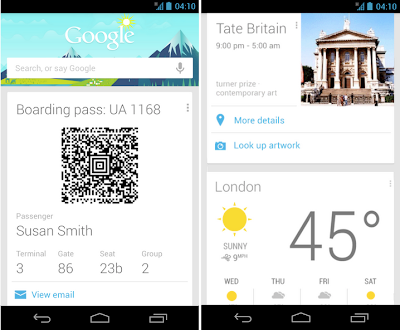
As you head off this holiday season, the latest update to Google Now makes it even more useful for traveling. Before you even leave your house, Google Now will tell you what the weather will be like at your destination (just in time to make sure you remember to pack those mittens). At the airport, your boarding pass is automatically pulled up, helping you breeze through to the gate (launching shortly for United Airlines, with more to come). And once you've arrived at your destination, Google Now can help you uncover some great activities, by showing you events happening around you, suggesting websites for you to explore as you research things to do, or allowing you to learn more about specific pieces while you’re at a museum (using Google Goggles).
All of this builds on top of some of the other cards designed for travel, like the currency conversion, translation, and flight status cards -- hopefully taking a little bit of the stress out of holiday travel so you can focus on family and fun.
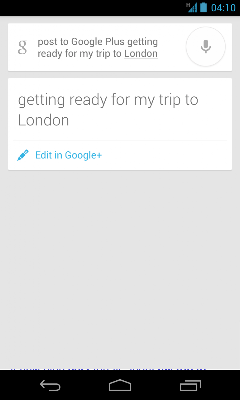
We're also making Voice Search even more powerful: you can find out the name of the song that’s playing (“What’s this song?”), quickly find product info (“Scan this barcode”) and post updates to Google+ simply by using just your voice.
These goodies are waiting for you in the updated
Google Search
app, available on
Google Play
for devices running Android 4.1, Jelly Bean, or higher.
Posted by Baris Gultekin, Product Management Director
Oktoberfest anyone?
Friday, September 21, 2012
(Cross-posted on the
Google Inside Search blog
)
If you’re thinking about attending
the 179th Oktoberfest
, there’s still time. It runs September 22 -October 7 in Munich, Germany. Just in case you’re planning a trip, we’ve assembled some tips for how you can use Google tools like Flight Search, Hotel Finder, Maps and Transit to help you plan an amazing trip -- whether you’re using your desktop, laptop or on your Android device.
If you want to figure out the best beer tents to visit, this
Google Map
will be a great place to turn during the event (will be live 09/22/12). When the pin over the tent is green, the tent still has seating and is open. When the pin is red, the tent is closed because of overfilling.
My favorite tent is the Hippodrom, a smaller tent frequented by a younger crowd -- and recently discovered by celebrities. It offers beer -- of course -- but also has a sekt (sparkling wine) bar that is pretty stylish. You should plan on arriving early if you want to visit.
You can also see live pics from Oktoberfest by clicking on various webcams on the
map
. This capability is very useful in providing information to help you choose the tents you’re most interested in visiting.
You might also want to plan ahead and consider the crowds and traffic. With Google Maps for Android, you can take a look at live traffic to see if you want to drive -- or choose to just walk, bike or take transit.
If you want to see more of Germany, you can use
Google Transit
to reach other cities such as Hamburg or Frankfurt. This navigation tool includes information about Deutsche Bahn (DB) trains and recommends the best transit options, taking into account various factors such as duration and number of Umstiege (transfers/stops). The options are then shown on the map, along with time, train type and duration of the trip. This is especially handy because it’s possible to click through from the transit options page, to purchase your tickets on
bahn.de
without needing to reenter the dates!
And if you’re a non-Bavarian who doesn’t speak German, don’t worry. You can use Google Translate or the official
Oktoberfest dictionary
to communicate with the locals.
So now that your interest is piqued, you’ll probably want to plan a trip right away. You can do so by going to
www.google.com
and searching for [flights to Munich]. Your departure city will be automatically recognized; mine was New York City. As you change your dates, prices will instantly update.
I prefer nonstop flights, so I clicked on “Nonstop” to get a list of flight times available at the $1,073 USD price and then evaluated various attributes of the flights -- including the cost of checked bags for this ticket. Once I picked the flights that worked for me, I clicked the red “Book” button to make my booking via the airline’s website.
Finally, you can use Hotel Finder to find hotels near Oktoberfest in Munich. You can do this by going to
www.google.com/hotelfinder
and entering [Oktoberfest Munich, Germany], along with the dates you plan to be in town. You can use the reviews, images, ratings and pricing information to create a shortlist. Once I selected the hotel I was interested in, I used the red booking button which took me to
www.booking.com
to complete my reservation.
We hope you found these tips helpful. Whether you end up hitting the Wiesn tents this October, or visiting Germany at some point in the future, we hope to help you plan your trip and connect with travel suppliers with ease.
Posted by Noam Ben Haim, Senior Product Manager, Travel
Find flights while on the go
Tuesday, February 21, 2012
(Cross-posted on the
Google Inside Search blog
)
Planning trips is fun and exciting, and ideas for where to go on your next adventure can strike you when you're in the most unexpected location. Last week I met a friend for coffee, and he told me about his recent trip to Maui. His story and photos inspired me and I immediately made a note to myself to check flights to Hawaii at home.
Since we launched
Flight Search
back in September, we’ve been hard at work improving the features, increasing coverage and making it easy to
find flight results directly from google.com on your desktop
. Starting today, we're also making it easier to find flights departing from the US on your mobile device.
For example, when you search for [flights from Chicago to Daytona Beach] you’ll see a table that shows available flights, including duration and prices. You can adjust dates on the page, or click any flight to further research and book your trip.
The Flight Search feature on mobile browsers offers all the benefits of Flight search on desktop:
Find flights quickly with results that load instantly and a list that’s easy to scan
Discover places to go on a map - see ticket prices for various destinations by surfing the map. You can filter by price, airline, or flight duration.
Find the best time to go - Click the calendar icon to see what dates will get you low prices.
The feature is available on Android and iOS devices. To learn more about the Flight Search feature, see our tips at
http://www.google.com/insidesearch/flights.html
.
Posted by Gus Prevas, Software Engineer
Talk with the experts in our new Matrix and OnTheFly discussion forum
Wednesday, January 18, 2012
Many expert flyers use our powerful Matrix and OnTheFly search tools to help find the perfect flight. In Matrix, you can use our advanced routing language, calendar view, and multi-city search to construct the right search to meet your needs. OnTheFly gives you a streamlined mobile interface to help you narrow down your options quickly.
Today we added a new
discussion forum
to help users get even more out of Matrix and OnTheFly! The discussion forum provides a venue for all users to get help from a large audience, including Googlers with both an extensive knowledge of Matrix technology and the airline industry, as well as external Matrix and OnTheFly mavens. It’s a space where power users can share tips with one another and learn how other people are using our products.
Interacting with our users in the forum will help us get to know you and your priorities even better. The forum will also supplement our recently revamped help content for
Matrix
and
OnTheFly
as a knowledge repository of tips and tricks for getting the most out of our products.
We hope you’ll drop by the
new forum
and leave us a note!
Posted by Jacqueline Dozier, Consumer Operations
Star Alliance FareFinder app now available across all mobile platforms
Tuesday, December 20, 2011
The Star Alliance FareFinder app can now be used on Android, BlackBerry and iPhone. The free flight search app, powered by ITA Software by Google, lets travelers search, find and shop for the best airfares for domestic and international trips across all 27
Star Alliance member airlines
. It can be used by frequent flyer members and non frequent flyer members. FareFinder enables you to quickly find the best flight and offers an option to book your preferred flight directly from your mobile device.
Find out more about
FareFinder
and how to download or access the app on the Star Alliance website.
Posted by David Peller, General Manager, EMEA/India/Asia-Pacific
OnTheFly™ 1.2 for Android just made it easier to plan your trip
Friday, September 30, 2011
We just released the latest version of our airfare shopping mobile app for Android. One of the new features in OnTheFly™ 1.2 is the flexible date search that allows you to browse 35 days of potential departure dates on a calendar combined with an interactive price graph.
You can also save and access search history now, including particular itineraries of interest. We’ll even check price changes for those itineraries so you can know the best time to plan that dream trip.
Designed to demonstrate the comprehensive search abilities offered with our QPX™ airfare shopping engine, OnTheFly makes it fast and fun for you to compare options across airlines, dates, and alternate cities/airports.
If you haven’t already tried OnTheFly, you can download it for free from the
Android Market
or
App Store
. OnTheFly for use with BlackBerry (OS 4.6+) can be accessed at
http://bbmatrix.itasoftware.com
.
We’re excited about the response to OnTheFly so far, both from our first time and loyal users! Keep sending us your
feedback and suggestions
.
Posted by Stefan Frank, Product Manager
Labels
Case studies
Corporate news
Customers
Google Flights
Google Flights price tracking
Google hotel search
Google Travel Blog
Guest post
Hotel Deals
hotel search on google
Hotels
Industry news
Mobile
New features
product announcements
Products
Smart Filters
Travel
User tips
Videos
Archive
2016
Jul
Mar
Feb
2015
Nov
Oct
Sep
Feb
2014
Dec
Nov
Oct
Sep
Aug
Jul
Jun
May
Apr
Mar
Feb
Jan
2013
Dec
Nov
Jul
May
Mar
Feb
Jan
2012
Dec
Oct
Sep
Aug
Jul
Jun
May
Apr
Mar
Feb
Jan
2011
Dec
Nov
Oct
Sep
Feed
Follow @googletravel
Give us feedback in our
Product Forums
.